Use & build with Copilot
Develop your own Copilot skills and, when relevant, prepare to deliver customer engagements.
Explore the user journeyBuild the knowledge you need to use, build with, or sell GitHub Copilot. Choose the journey that fits your goal, and explore both whenever you need.
Develop your own Copilot skills and, when relevant, prepare to deliver customer engagements.
Explore the user journeyBuild the knowledge to discover customer needs, communicate value, and guide the next conversation.
Explore the sales journeyEveryone can use and build with Copilot, including sellers. Explore the user journey below to learn the concepts, practice the skills, and build at the level that fits your experience.
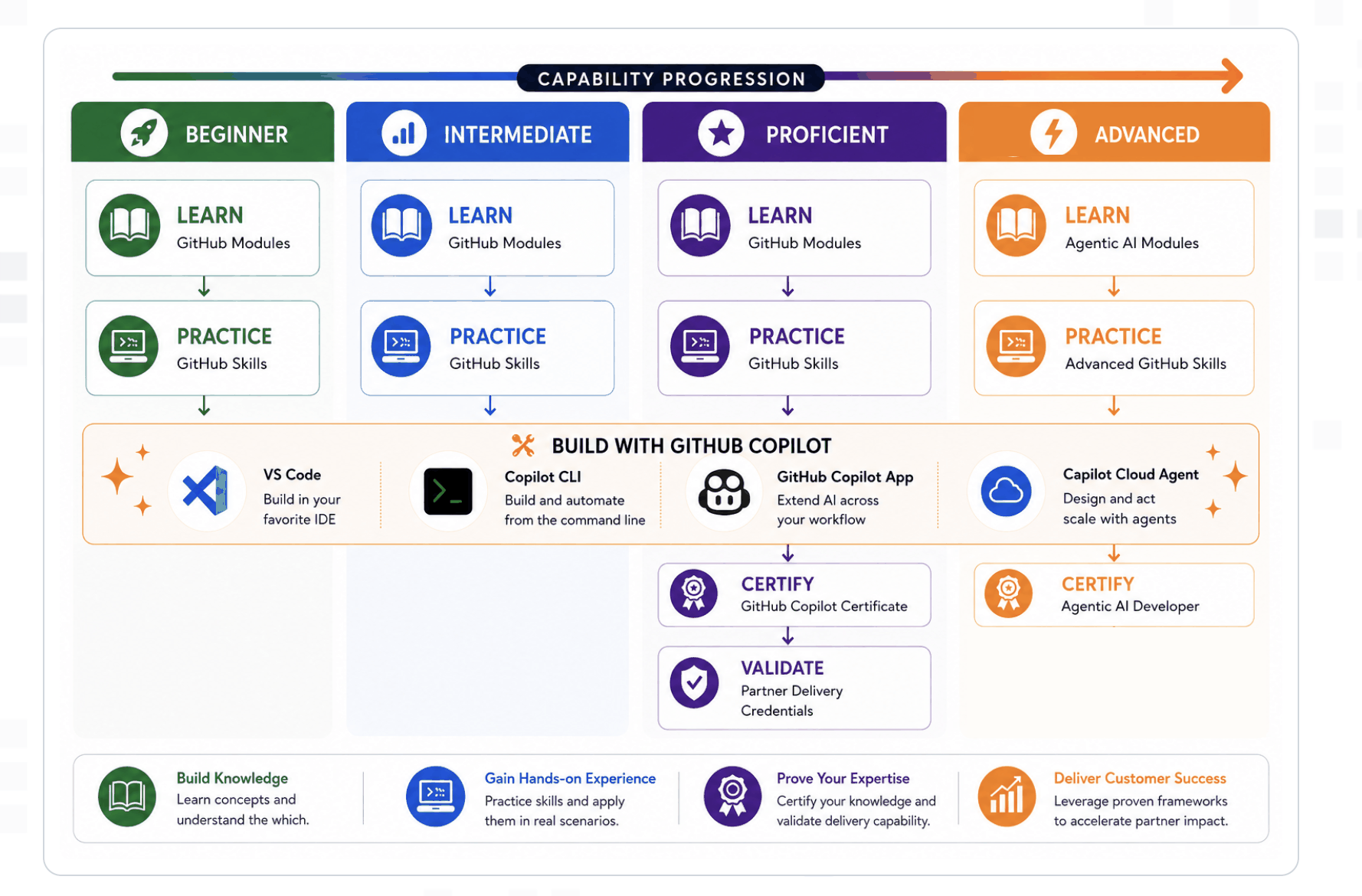
Choose the description that sounds like you. You can start at any level or revisit earlier skills.
I'm new to Copilot
Understand the basics, write your first prompts, and try Copilot in everyday development.
View beginner coursesI've tried the basics
Improve your prompts, customize your experience, and use Copilot for testing and code review.
View intermediate coursesI use Copilot regularly
Apply Copilot across projects, share context with your team, and prepare for certification.
View proficient coursesI'm ready for agentic workflows
Explore agent mode, MCP integrations, and modernization with Copilot.
Proposed courses; level definition is being finalized.
View advanced coursesLearn with an instructor, practice together, and ask questions in real time. Look for the audience label to find sessions for Copilot users, customer delivery, or sellers.
Example session topics for this layout, not scheduled events. Confirmed dates, instructors, registration links, and recordings will appear here.
A guided introduction to prompts and everyday development tasks.
Date and registration to be confirmed
A hands-on workshop covering context, customization, testing, and code review.
Date and registration to be confirmed
Practice discovering customer needs and connecting Copilot capabilities to customer outcomes.
Proposed session; date and registration to be confirmed
Explore how to apply Copilot skills when delivering on behalf of GitHub.
Date and registration to be confirmed
Learn from peers across both journeys. Share repositories, demos, reusable workflows, and lessons from customer conversations.
Example showcase slots. Links will be added as contributions are approved; these are not published projects.
Show what you built with Copilot, your learning level, and what you learned along the way.
Repository or demo link pending
Share useful prompts, custom instructions, or agent workflows that others can try.
Example or walkthrough link pending
Share an approved, anonymized example of how you connected a customer need to a Copilot use case.
Peer-learning example pending
Share an approved, anonymized case study with practical takeaways for other delivery practitioners.
Case study link pending
To contribute, include a title, your journey (and learning level, if relevant), a link to the work, and a short takeaway. Submission details are coming soon. Customer examples must be anonymized and approved for sharing.
Certifications validate your own knowledge and skills. For example, the GitHub Copilot certification is a milestone in the Proficient pathway.
Partner delivery credentials validate your ability to deliver for customers on behalf of GitHub. They focus on customer engagements, including GitHub Copilot: Core Skills & Application and GitHub Copilot: Deploying & Scaling AI Across the Enterprise. A certification is not the same as a delivery credential.
You do not need a delivery credential for individual self-paced learning. Credential requirements and enrollment links will be added when confirmed.